Most people see IP address as a boring technical term from router settings. In reality, it is a very simple piece of data that can be linked back to very real things about you: your city, your area, and often the place where you live.
This text is not about scaring you. It is about explaining, in plain language, what an IP address is, what others can learn from it, and what you can do if you want to reduce that exposure.
What an IP address actually is
An IP address is a number that your internet provider gives to your connection. When you open a website, watch a video, or send a message, your device sends requests through this address. The site answers to the same address.

Without an IP address, your browser would not know where to send requests, and websites would not know where to send responses. Every action online goes through some IP address, even if you never see it.
What one IP address can tell about you
From a single IP address, services can often see:
- the country
- the region or state
- the city
- the internet provider
- sometimes the approximate street or building
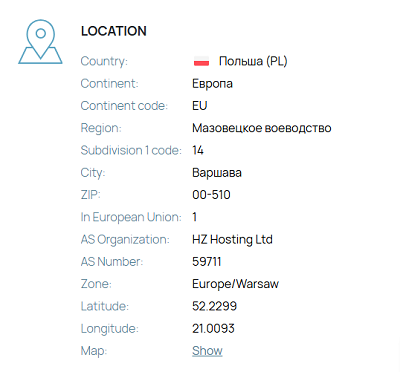
The level of detail depends on how the provider allocates addresses and how accurate the geolocation database is. In some cases it will show only the city. In other cases it can be close to a specific building or entrance.
Anyone who has your IP and uses a public IP lookup service can get this approximate location. For example, you can test it on yourself on whoer.net and see what it shows for your connection.
This is not an activity reserved for big companies or governments. It is simple, cheap, and widely available. That is why “finding someone by IP” is routine for many people who work with networks or security. It is not a rare, special operation.
How logs make “work with the past” possible
When you visit a website, connect to a game server, or use an app, your IP address is usually written into logs together with the time and some technical details. These logs are kept for monitoring, billing, analytics, or security, and they often live much longer than your actual visit.
This has an important consequence: even if someone sees your IP only once, they can record it and come back to this record later. An administrator of a forum may save the IP addresses of all posts, a small service may store the IPs used for login attempts, and a game server may keep the IPs of all connections.
If at some later point they want to know whether a certain IP was active on their system, they can search those past logs and quickly get an answer. If they also know whose home that IP was linked to at that moment, either directly or through a provider request, then the activity in the logs can be associated with a specific person or at least with a particular household.
Why your home IP is usually the main one
Most people go online from the same places every day: their apartment or house, and sometimes an office or coworking space. From these locations they buy things, log into email and social media, play online games, and write messages and comments.
All of this activity is tied to the same IP address for long periods of time. Over weeks and months, your home connection becomes much easier to link to your everyday life than any random Wi-Fi network you might use once.
So when someone starts with an IP address and wants to guess where you live, they usually end up at your home connection, not at the café you visited once on vacation.
Is this legal, and who can ask your provider?
Using IP geolocation databases and public tools like whoer.net is legal in most places. These services do not show your name; they only provide approximate technical information and location based on your IP address.
Your provider, however, sees a lot more. The provider knows who pays for the connection, the installation address, and the contact details tied to the account. In many countries, law enforcement can request this information from the provider in specific cases, for example, during a criminal investigation. If such a request is approved under local law, the provider gives them your name and address for a given IP and time period.
Most private individuals cannot officially ask providers for this level of detail. They can still use IP geolocation tools and whatever data they have collected themselves, but they do not have direct access to subscriber records. The main problem is that many users are not aware of how simple and common IP lookup is. They often think it is something only large organizations can do, while in practice almost anyone with basic technical knowledge can perform at least a rough lookup.
Who might care about your IP, and how risky it is
For most people, nothing dramatic ever happens with their IP address. Many companies log it, many services see it, and then nothing special follows. Your IP just quietly sits in technical records and never becomes the center of attention.
Still, the risk is not zero. An IP address can be interesting to a stalker trying to figure out where you live, a scammer who wants to sound more convincing by naming your city, a hacker scanning addresses of a specific provider or region, or a private investigator or simply a person doing their own “investigation”.
This becomes a real problem in a few types of situations. Personal conflicts are one example: heated breakups, harassment, or offline conflicts that move online can push a persistent person to start collecting technical data about you, including IP information. Another scenario is public activity. If you run a visible project, moderate a community, or speak on sensitive topics, some people may try to connect your online identity to a physical address. A third category is work with sensitive information. Journalists, activists, security researchers, and similar groups often have stronger reasons to care about how easily their location can be inferred.
If none of this applies to you, the basic risk is lower, but it still exists. At a minimum, an IP address gives strangers your approximate city and provider, and that alone is already used in many social engineering schemes.
Why “public Wi-Fi instead of home” is not a good solution
A common idea sounds simple: “I will just use internet from a café or library, so my home IP will not show.” In practice, this is a weak and unsafe method that removes one problem by creating others.
Public Wi-Fi is often poorly protected, and you do not control who else is on the same network or what they are doing there. Network owners can log your activity and the IP addresses you use, and you have no real insight into how long they keep this data or what they do with it. On top of that, it is easy to make basic security mistakes in such environments, such as logging into personal accounts or reusing passwords without thinking about it.
You also still reveal a physical location: the café, library, or other place where you are connected. So this is not real protection; it is just a change of where your activity points to.
Tools that actually reduce how visible your IP is
If you want to limit what people can learn from your IP, there are a few technical options, each with its own trade-offs.
Tor routes your traffic through several volunteer servers. The sites you visit see the IP address of the last server in the chain, not your own. It is free to use and does not rely on a single company, which many people see as an advantage. At the same time, it is usually slower than regular browsing, some sites block or limit connections that come through it, and using it safely requires at least basic understanding of security practices to avoid simple mistakes.
A proxy server forwards your traffic to other sites so that the site sees the proxy’s IP instead of yours. This can be simple to set up in many applications and can work for certain specific tasks, such as scraping or one-time checks. However, many proxies are poorly run or openly log everything that passes through them, a lot of sites already block known proxy ranges, and there is often no encryption between you and the proxy. Because of these issues, many people consider classic proxies outdated for everyday privacy.
A VPN creates an encrypted tunnel between your device and the VPN server. From the outside, your traffic appears to come from the VPN server’s IP address. This means your provider sees that you use a VPN, but not which sites you open. Websites see the VPN server IP instead of your home IP. If the VPN is configured correctly, local networks such as public Wi-Fi hotspots also see less useful data about your activity.
With a VPN, trust moves from your provider to the VPN provider. That is why it is important to choose a service with clear policies and a solid technical setup. As an example, whox vpn is one of the services that combine a VPN with tools to check how your connection looks from the outside. For self-checks, you can again use whoer.net to see the IP address and location that a site sees when you are connected through a VPN.
What to remember
An IP address is not just a random number hidden in your router menu. It is a technical identifier that can be linked to your city, your provider, and often your home.
You do not need to live in constant fear because of it, but ignoring it completely is also not a good idea. A reasonable approach is to understand that your home IP is the one that appears the most in your online life, to remember that IP geolocation and logging are normal and widespread practices, and to honestly evaluate your own situation in terms of conflicts, public activity, and type of work. If your situation calls for it, it is better to use tools like a VPN or Tor than to rely on the hope that no one will ever bother to check your IP.
Once you start looking at IP addresses this way, they stop being an abstract technical detail and become just another part of your online behavior that you can manage more consciously.