Every website you visit, every search you run, and every form you submit gets tagged with your IP address. Your ISP logs it, advertisers profile from it, and data brokers sell it. If you’ve ever wondered how to hide my IP address, you’re not being paranoid; you’re being practical. This guide covers the methods that actually work, how to pick the right one for your situation, and how to confirm your IP is truly hidden after you’ve set things up.
What your IP address reveals (and why hide it)
Your IP address is a unique number your internet service provider assigns to your connection. It exists in two forms:
- A public IP, visible to every server you contact;
- A private IP, used only within your local network.
The public one is what matters here.
What a public IP exposes is more than most people realize. IP geolocation and tracking can pinpoint your city, ISP, and sometimes neighborhood. Advertisers build behavioral profiles from your browsing patterns. Your ISP can throttle your bandwidth based on the type of traffic it observes. And anyone running a scan can use your IP address as a starting point for probing your connection.
Hiding it isn’t about doing anything suspicious. IP protection is basic privacy hygiene, just like locking your front door.
Here are the major reasons why you should mask your IP address:
- Stopping advertiser tracking;
- Preventing ISP throttling;
- Reducing your exposure to opportunistic probing;
- Accessing geo-restricted content from your actual location.
If you’re wondering how to hide my IP, Proxy-Seller proxy plans deliver ethical residential and mobile IPs across 220+ locations, featuring clean dedicated pools, HTTP(S)/SOCKS5 support, and high trust scores to bypass platform detection. Use the WHOER15 coupon code to get an extra 15% off on high-quality proxies.
Top methods to hide your IP address
Anyone looking into how to mask my IP quickly learns there’s no single tool that’s right for every situation. The right method depends on whether you need encryption, speed, geo-targeting, or scale. Here’s how the main options compare.
Proxy servers: residential, SOCKS5 & HTTP(S)
A proxy replaces your real IP by routing your requests through an intermediary server. The destination sees the proxy’s address, not yours.
The type of proxy matters. Residential proxies use IP addresses assigned by real ISPs to actual user devices, so they carry high trust and are far less likely to be flagged. Mobile proxies take this a step further, routing traffic through real mobile carrier networks and cycling through 3G/4G/5G networks that are nearly impossible to distinguish from genuine user traffic. Datacenter proxies are faster and cheaper, but easier to detect.
At the protocol level, HTTP(S) proxies handle web traffic and can inspect headers. SOCKS5 proxies are lower-level and work with any type of traffic, including SSH and custom applications.
- Pros: application-specific configuration, automatic IP rotation capabilities, diverse proxy types.
- Cons: lack of transport-layer encryption, system-wide integration failures causing traffic leakage.
For serious IP protection, rotating residential IPs are the strongest option: each request or session can come from a different real residential address, making profiling significantly harder.
Proxies are the optimal solution for enterprise-level IP masking across high-volume use cases, including ad verification, automated web scraping, and SERP analysis. You can buy residential proxies from Proxy-Seller. It offers clean, ethically sourced pools with geo-targeting across 220+ locations.
VPN
A VPN (Virtual Private Network) routes all your device’s traffic through an encrypted tunnel and assigns you the server’s IP address. To any outside observer, you appear to be connecting from the VPN server’s location.
This method has its pros and cons:
- Pros: easy to set up, encrypts all traffic, protects from DNS leaks, and works well on public Wi-Fi.
- Cons: quality providers are paid, free ones often log your activity, and speed loss is possible depending on server load.
Tor browser
Tor routes your traffic through at least three volunteer-run nodes, encrypting it at each hop. No single node knows both who you are and where you’re going.
- Pros: free, no account needed, strong anonymity for high-risk use cases.
- Cons: significantly slower than direct connections, easily detectable, and not suitable for streaming or large file transfers.
Other quick methods: public Wi-Fi, mobile data, Apple Private Relay
A few lighter options can change your visible IP, though each has real limits:
- Public Wi-Fi: swaps your IP but adds no encryption of its own.
- Mobile data: assigns a new IP, but it’s still tied to your carrier account.
- Apple Private Relay: hides your IP from sites and from Apple itself, but it only works inside Safari and Apple’s own apps.
These are partial, temporary options, not a substitute for proper IP protection.
At-a-glance comparison
Here’s a comparison of the three methods covered above:
| Method | Hides IP | Encrypts traffic | Speed | Geo-targeting & rotation | Cost |
|---|---|---|---|---|---|
| Residential proxy | Yes | No | Fast | Yes | Free / Paid |
| VPN | Yes | Yes | Medium | Limited | Free / Paid |
| Tor | Yes | Yes | Slow | No | Free |
VPN vs. proxy: which should you choose?
The difference comes down to scope and purpose. A VPN encrypts all traffic from your device and works at the OS level. It’s the right choice when you need a private tunnel on an untrusted network, like a coffee shop Wi-Fi, and you want every app covered automatically.
Proxies work at the application or request level. They don’t encrypt traffic, but they’re faster, support rotation across thousands of IPs, and give you precise geo-targeting control. For use cases that require changing your visible IP at scale (price monitoring, data collection, or multi-location testing), proxies are the more practical tool.
For flexible, high-performance IP protection with geo-targeting and rotation, quality residential proxies are typically the stronger pick. You can also buy proxies through Geonix, another reliable and fast option for stable residential and datacenter proxy infrastructure.
How to hide IP address on iPhone & Android
The simplest option to hide your IP on an iPhone is to install a VPN app from the App Store. To hide your IP address on iPhone effectively, a VPN app covers all traffic, not just the browser’s.
If you’re subscribed to iCloud+, Apple Private Relay automatically masks your IP in Safari and WebKit-based requests without any extra app.
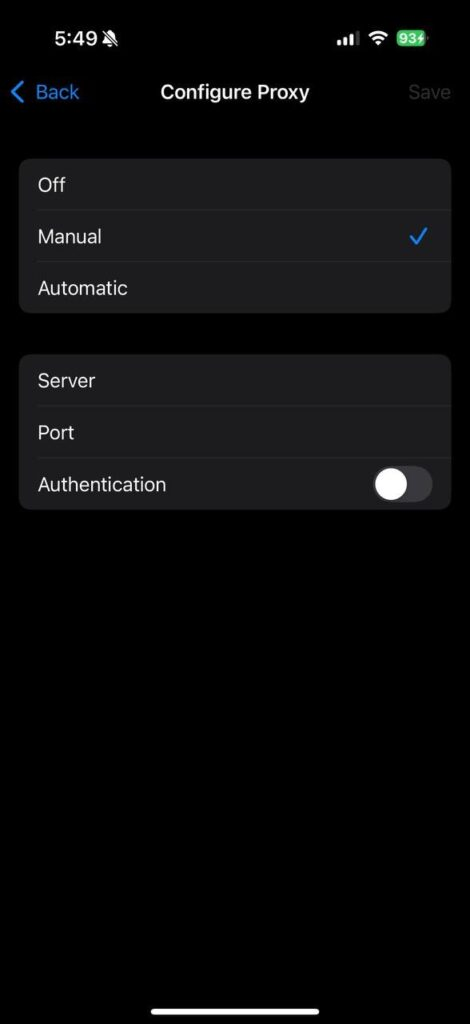
For finer control, configure an HTTP(S) or SOCKS5 proxy manually in Settings → Wi-Fi → your network → Configure Proxy.
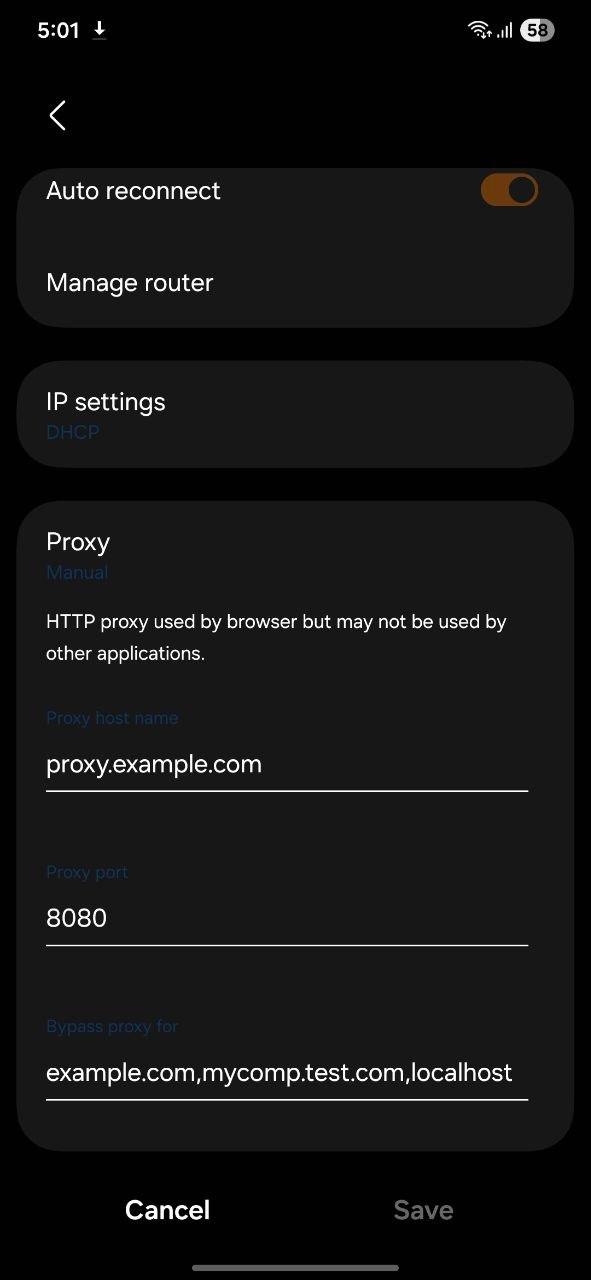
Now, here’s how to hide your IP address on Android: install a VPN app from the Play Store, or set a proxy manually in Settings → Wi-Fi → your network → Advanced → Proxy.
You can also switch from Wi-Fi to mobile data to change your visible IP quickly, since your carrier assigns a different address. To hide your IP address on Android and confirm it worked, verify your new IP using an IP lookup tool before continuing.
How to check if your IP is really hidden
Changing your IP is only half the job. Leaks at the DNS or WebRTC layer can expose your real address even when a proxy or VPN is active, and a distinctive browser fingerprint can re-identify you regardless of which IP you’re using.
After masking your IP, run these checks:
- IP and geolocation lookup: confirms which IP is visible and whether it matches your intended location.
- DNS leak test: checks whether your DNS queries are routing through your chosen provider or falling back to your real ISP.
- WebRTC leak test: WebRTC can expose local IP addresses through the browser even with a proxy active; this test surfaces that.
- Browser fingerprint check: your screen resolution, fonts, timezone, and browser settings form a fingerprint that can identify you even without a fixed IP.
Whoer.net provides all of these checks in one place, including a full anonymity score that shows where your setup succeeds and where it leaks. Run it after every configuration change before trusting your setup.
Conclusion
Searching for hide my IP is the first step. The next step is to match the method to your specific situation and verify the result before you rely on it. For everyday encrypted browsing and public Wi-Fi protection, a VPN is a solid, low-effort choice. For situations that require control over your visible IP (geo-targeting, rotation across locations, or request-level IP masking at scale), rotating residential proxies offer more flexibility and better performance.
Whatever method you choose, always verify the result. A setup that hides your IP but leaks DNS or exposes your WebRTC address gives you false confidence. Test after setup, and re-test after any configuration changes.