Someone who earns a living through a screen usually thinks in terms of projects, clients and platforms. The connection itself feels invisible as long as it works. Yet every task they do, from answering a message to pushing code, leaves a technical trace that points back to the place they are working from. At some point, whether out of curiosity or necessity, they end up looking at that trace and asking Whoer.net what is my IP and why does it matter.
For anyone who spends their days online, understanding what is my IP is often the first step toward realising how much of their working life is mapped, evaluated and sometimes restricted based on the network they use. It is not about turning into a network specialist; it is about seeing one more part of their professional identity that other systems already rely on.
What is my IP as part of an online identity
An IP address is simply a number that lets data find its way across the internet, but in practice it behaves a lot like a digital return address. When a freelancer logs into a project management tool from home each morning, or a remote employee connects to company email, the services on the other side see more than just a successful login.

They can usually infer which country and city the person is in, which provider they use, and whether the connection looks like a household line, a mobile network, or an office. Over time, the address becomes associated with working hours, typical behaviour, and the set of tools person uses.
On its own, this does not reveal a name or a street, but it does form a pattern. When a pattern repeats day after day, the address turns into part of that worker’s online identity, whether they are aware of it or not.
How services use IP information
Most serious platforms log activity so they can keep things running, answer support questions, and defend against abuse. IP addresses play a quiet but central role in those logs.
Security systems use them to decide whether a login looks normal. A writer who always connects from one region and one type of device will have an easier time than someone whose access jumps between continents and different network types in a single afternoon.
Fraud checks at payment providers lean heavily on IP behaviour. If an account that receives client payments suddenly starts sending requests from an unusual place, with a device that has never appeared before, automated systems may slow down transfers or ask for extra verification.
Team tools may also depend on IP patterns. Some companies limit access to internal dashboards or code repositories based on expected address ranges. If an address falls outside what they trust, even a valid password might not be enough.
In all these situations, the person is not judged by content alone, but by the network they seem to come from.
What is my IP in security checks and account access
When a worker checks what is my IP, they can begin to see themselves the way these systems see them. The address on the screen is the same one that appears in logs and risk models elsewhere.
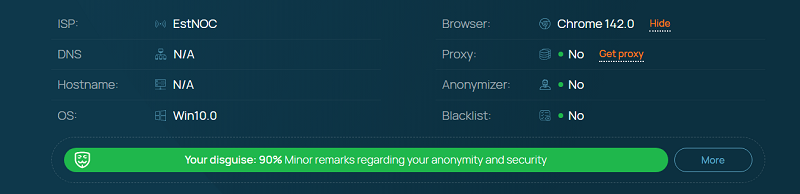
If they always sign in from a single home connection, that address becomes a strong signal of continuity. It tells platforms that this is probably the same person on the same machine. A sudden change to a hotel network in another country may trigger extra questions, not because anyone is watching them personally, but because the pattern is different.
The reverse is also true. Someone who constantly switches between shared Wi Fi, phone hotspots, and old routers makes it harder for automated systems to tell the difference between a normal change and a stolen account. From the outside, everything looks unstable, even if the person is simply working while travelling or juggling several roles.
Understanding this link between the address on the screen and the level of trust in each login helps online workers plan ahead. They can choose when to use stable, known connections and when to expect friction.
Everyday risks for people who live on the internet
Working online brings a set of quiet risks that are easy to overlook because nothing dramatic happens at first.
One risk is that personal and professional lives merge on the same network. A person might manage client documents, private chats, banking and entertainment from a single laptop and home router. To outside systems, these different activities share the same technical footprint. If something compromises that environment, it reaches many parts of their life at once.
Another risk comes from old or weak equipment. A router that has not been updated for years, or a system running outdated software, can have known weaknesses. Once someone with bad intentions discovers the external address, automated tools can repeatedly probe it, looking for ways in.
There is also the social side. In hostile situations, such as harassment or targeted abuse, technical details like a stable IP range can help determined people narrow down where someone lives or works, especially when combined with publicly available information.
None of these risks mean that online work is unsafe by default. They simply mean there are more moving parts than a screen and a keyboard.
Simple ways to reduce exposure
The goal for most people is not perfect anonymity. It is a reasonable level of control over how much their work environment reveals.
One helpful habit is to separate contexts. Work that involves money, confidential data or long term client relationships can be kept on a profile or device that is not used for casual browsing and experiments. This limits how much one address and one browser connect different sides of their life.
Another habit is being selective with networks. Home connections deserve strong passwords on the router and occasional checks for firmware updates. Public Wi Fi is best treated as a place for light tasks, not for changing passwords, signing contracts or handling sensitive client material.
Regular self checks also help. Taking a moment now and then to look up the current IP address and see which location and provider it shows is a quick way to stay aware of what other services already know. If the result looks strange or too precise, it may be time to adjust settings or move sensitive work to a safer environment.
Keeping systems and apps reasonably up to date closes many simple paths attackers rely on. These updates are rarely exciting, but they remove weaknesses that often depend on knowing the target’s address.
Seeing the connection as part of the job
Online workers spend a lot of time thinking about their skills, their tools and their relationships with clients and teams. The network that carries all of that can feel like a background detail. In reality, it plays a permanent role in how platforms recognise them, how much friction they face and how easily others can connect scattered pieces of information about their lives.
By taking a little time to understand what is my IP and how it fits into that picture, anyone who works through the internet can make more deliberate choices about where and how they connect. The work stays the same, but the ground it stands on becomes more stable and safer.