

Browser automation: why a website sees a program and how to fix it
You started the browser from a program: a test, a scraper or a helper that clicks for you. You open Whoer, and there's a red row in the IP Quality card: Browser automation: Found: webdriver. The window looks like any other and pages open fine. How does the website know?
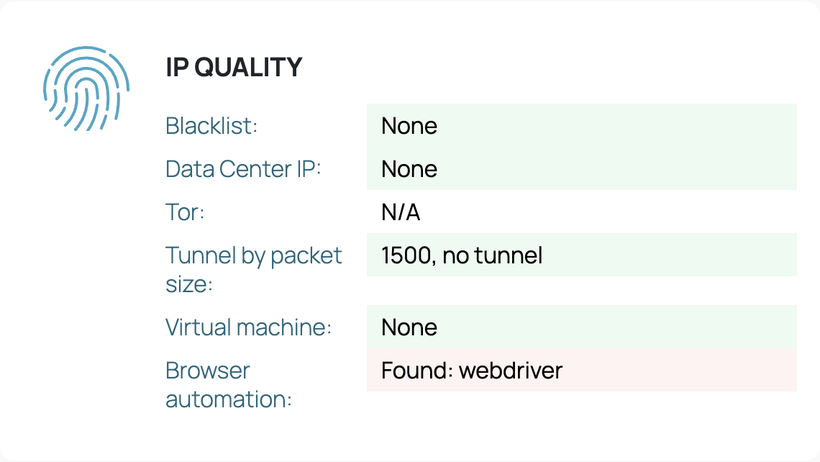
From the browser itself. It has three ways to tell a website that nobody human is at the wheel, and Whoer checks all three.
Three signs
The webdriver flag
Every browser has a property called navigator.webdriver. When a program drives the browser, it's switched on. The standard wants it that way: a website has the right to know it isn't talking to a person. Selenium, Playwright, Puppeteer and other tools set this flag by themselves.
The word Headless
A browser can run with no window, that's how it's done on servers. In this mode it writes the word Headless into the User-Agent string, for example HeadlessChrome.
Chrome without the chrome object
A real Chrome has a service object called window.chrome on every page. If a browser calls itself Chrome and the object is missing, it's either not Chrome or it was started in a special mode. Whoer makes one exception, for the built-in browser of Android apps: the object is honestly absent there.
What the row shows
- None. Not a single sign.
- Found and a list: webdriver, headless, no-chrome. Every sign that was found is named.
- N/A. The browser didn't name itself at all, so there's nothing to judge by.
Automation takes up to 20% off your anonymity score. It also lowers the percentage in the IP Quality card itself: that one starts at 100 and loses the weight of every check that found something.
Where it comes from
You start the browser from a program yourself
Website tests, data collection, a script for routine work. All fair here, the row tells the truth.
Someone else's program started the browser
Some tools for working with several profiles and helpers for automatic actions open the browser with the same mechanism tests use. The window looks ordinary, and the flag is set. A hint: in this mode Chrome shows a bar under the address line saying it is being controlled by automated test software.
A browser with no window on a server
Services that take screenshots of pages or check websites on a schedule almost always work this way.
How to fix it
If you test a website or collect data with a script, there's nothing to fix. The website sees the same thing Whoer does, and it's true.
If you didn't expect the signs, here's what to do.
Open the website in a regular window
Start the browser yourself, from its icon and not from a program. A window opened by a person has no flag.
Check how the profile is started
If the program can open a profile in two ways, pick the regular start for manual work, without control over an API.
What does not help
- Changing the User-Agent. You can remove the word Headless, but the webdriver flag stays.
- A proxy or a VPN. They change the address, not the browser.
- Private mode and clearing cookies. The flag doesn't depend on them.
- Hiding the flag with a script on the page. Websites look at more than one property, and other small things usually give the fake away.
How to check the result
Open Whoer again and look at the IP Quality card. If it worked, the Browser automation row says None.
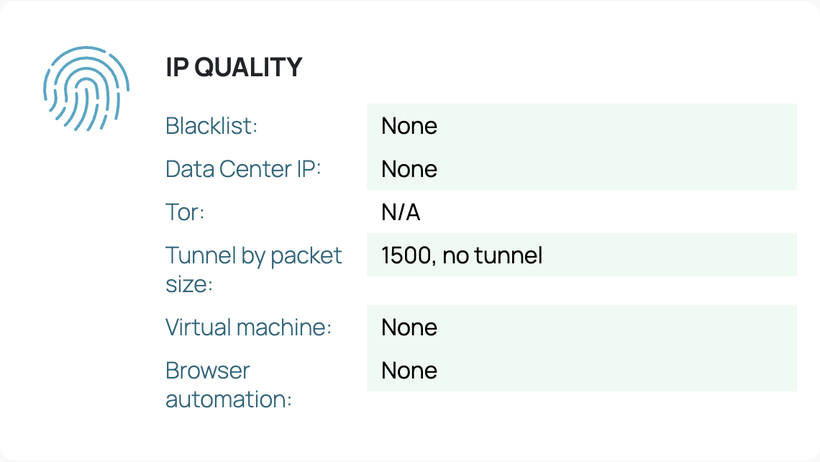
The row above is Virtual machine. There's a separate article about it.
Summary
The browser tells the website itself that a program is driving it.
- There are three signs: the webdriver flag, the word Headless in the name and Chrome without the chrome object.
- Testing tools set them, and so do programs that open the browser the same way.
- Whoer names every sign it finds.
- A window you opened yourself has none.