
Browser engine by HTTP/2: why a website sees another browser and how to fix it
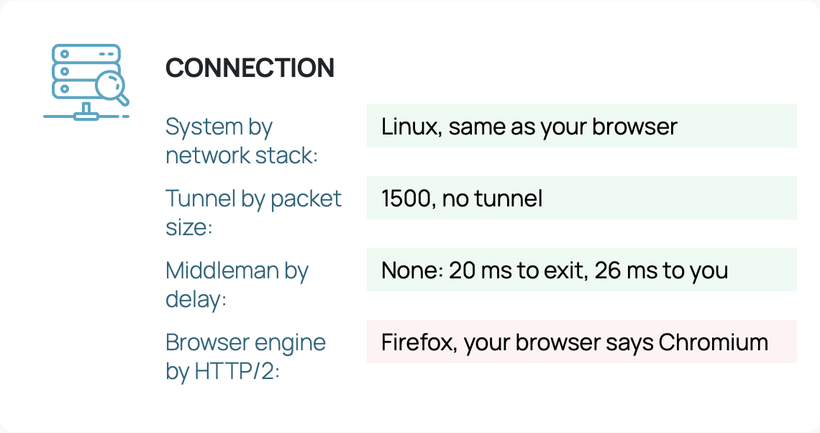
You installed an extension, and now your Firefox calls itself Chrome. You open Whoer, and there's a red row in the Connection card: Browser engine by HTTP/2: Firefox, your browser says Chromium. You changed the name, and the site still knows who came in.
The name isn't the problem. A browser gives itself away by how it puts a request together. Let's see what exactly the server looks at and why no setting can change it.
Three engines for every browser
There are many browsers and only three engines.
- Chromium. Chrome, Edge, Opera, Brave and Vivaldi all run on it.
- Firefox with its own engine.
- Safari with its own.
iPhone and iPad are a special case: every browser there has the Safari engine inside, even if the icon says Chrome or Firefox.
The engine also decides how the browser talks to the network. That conversation is what gives it away.
How a request reveals the engine
Almost every website today works over HTTP/2. Each request in it starts with four service fields: the method, the site address, the scheme and the path to the page. The set is the same for everyone, but each engine sends them in its own order.
| Engine | Order of fields |
|---|---|
| Chromium | method, site address, scheme, path |
| Firefox | method, path, site address, scheme |
| Safari | method, scheme, path, site address |
The order is built into the engine's network code. Settings don't change it, extensions don't change it, and neither does the User-Agent string. You can call yourself anything, and the fields still leave in the native order.
What Whoer compares it with
The Whoer server closest to you looks at the order of the fields and recognises the engine. Then it reads the User-Agent, where the browser names itself, and puts the two answers side by side. The row shows one of three things:
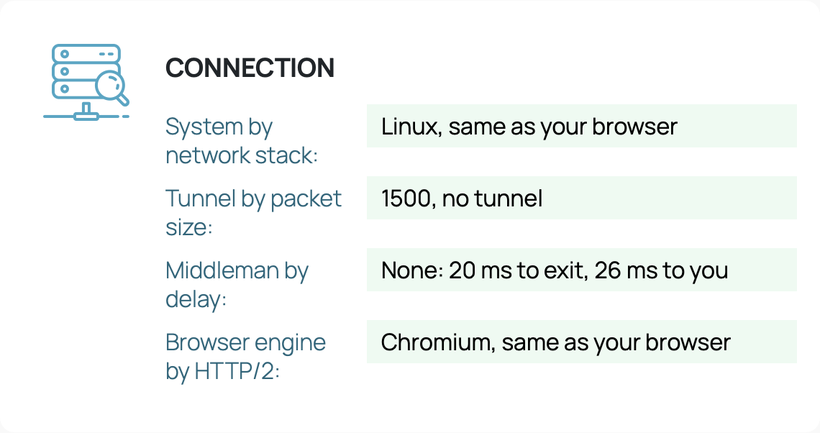
- Chromium, same as your browser. The order of the fields and the browser's words agree.
- Firefox, your browser says Chromium. They don't, and the row turns red.
- N/A. No answer. It happens when the check didn't finish in time, so reload the page. It also happens every time with the latest Safari and with old versions of Chrome: they send the fields in the same order, and Whoer doesn't guess which of the two it is.
A mismatch takes up to 20% off your anonymity score. If neighbouring checks of the same kind fired too, such as System by network stack or browser headers that disagree, Whoer treats them all as one signal and deducts once.
Where the other engine comes from
A spoofed User-Agent
The most common case. An extension or a setting changes the User-Agent string, and Firefox introduces itself as Chrome. The string is new, but the same old engine builds the request.
A browser with someone else's profile
Some browsers can show websites the profile of a different browser. If the browser itself is built on Chromium and the profile is taken from Firefox or Safari, the order of the fields stays Chromium's.
A program works instead of a browser
Scripts and scrapers often copy the User-Agent of a real Chrome. But a network library builds the request for them, and it has an order of its own.
Someone rebuilds the request on the way
A rare case. An antivirus with HTTPS scanning, or an office network that does the same, opens the connection to the site itself. The site then sees their order of fields, not yours.
A regular proxy or a VPN has nothing to do with this. The request travels inside encryption and reaches the site exactly as the browser built it. Proxies and VPNs leave traces of their own: a middleman by delay and the packet size.
How to fix it
There is one rule: the browser has to name the engine it really runs on.
Bring the real User-Agent back
Turn off the extension or the setting that changes it. It's the simplest fix and the most reliable one.
Change the name inside your own family
Chrome can call itself Edge or Opera: they share one engine, so the order of the fields matches. Chrome that calls itself Firefox shows at once. For more about the string itself see how to change the User-Agent in a browser.
Need another browser? Use it
Want to look like Firefox? Open the site in Firefox. That's the only way to get its order of fields.
In a browser with profiles, pick the native engine
If the browser is built on Chromium, take a Chrome or Edge profile. A Firefox or Safari profile on such a browser gives a mismatch.
Check your antivirus
If you never touched the User-Agent and the row is still red, turn off HTTPS scanning in your antivirus for a minute and reload Whoer. If the row turns green, that was the cause.
What does not help
- Another proxy, another VPN or another country. The browser builds the request, not them.
- Private mode and clearing cookies. The order of the fields doesn't depend on them.
- A more accurate fake User-Agent. The more careful the borrowed name, the more obvious it is that the request was built another way.
- Changing the language, the time zone and other settings. They are about something else.
How to check the result
Open Whoer again and look at the Connection card. If it worked, the row shows the name of the engine and the words same as your browser.
The row above is System by network stack. It works in a similar way, only it checks the operating system, not the browser. There's a separate article about it.
Check your connection on Whoer
Summary
You can write any browser name you like, but the browser builds the request the way it knows how.
- There are three engines: Chromium, Firefox and Safari. Each has its own order of the first fields in a request.
- The website compares that order with what the browser says about itself in the User-Agent.
- A mismatch usually comes from a spoofed User-Agent or a profile from another engine.
- Proxies and VPNs don't affect this row.
- An honest name fixes it: the real User-Agent or the name of a browser on the same engine.