

IPv6 address: why a website sees another network and how to fix it
You turned your VPN on. Whoer shows an address that isn't yours, just as planned. And lower down, in the IP address card, there's a red row: IPv6 address: 2001:db8:85a3::8a2e:370:7334, Germany, another network. What is this second address, and whose network is it?
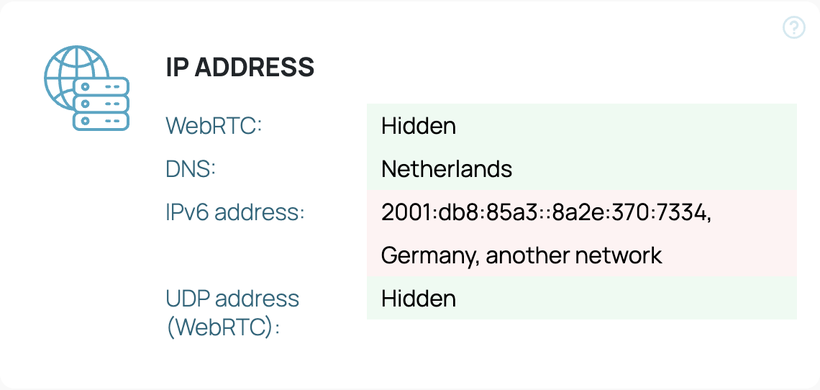
Most likely it's your real address. The VPN hid one, and nobody thought about the other. Let's see why a device has two addresses and how a website gets to see both.
Two addresses on one device
Two protocols live on the internet side by side. The old IPv4 with addresses like 203.0.113.7 and the new IPv6 with long addresses separated by colons. Many providers hand out both. Then your device has two addresses, and the browser picks which one to use: if a website supports IPv6, it usually goes that way.
A website sees the address you came from. It can also ask the browser to come twice and see both. That's what Whoer does.
What Whoer compares
The page sends a few short requests to the Whoer server closest to you: over IPv4 and over IPv6. The server notes both addresses and looks up where each one is from. It compares the countries first. If the country is the same, it compares the providers.
The row shows one of five things:
- Not used. The browser didn't come over IPv6. Nothing to compare, the row is green.
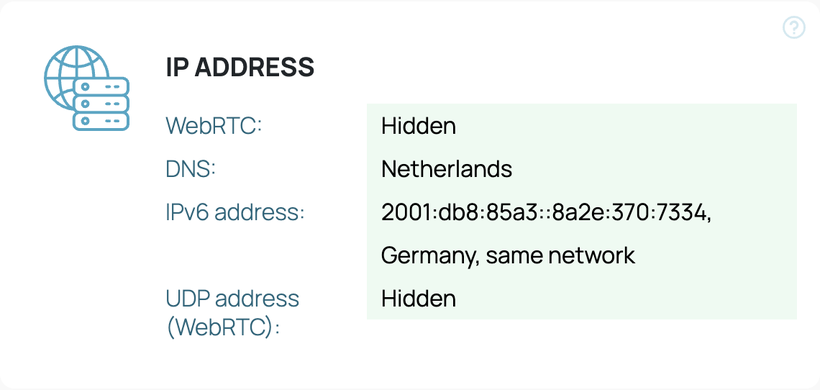
- Address, country, same network. Both addresses are from one country and one provider.
- Address, country, another network. The countries differ or the providers differ. The row turns red.
- An address alone. The database doesn't know where one of the addresses is from. No verdict, and it isn't counted against you.
- N/A. The check didn't finish in time, reload the page.
A mismatch takes up to 30% off your anonymity score. It's one of the heaviest checks: the website sees two of your locations at once, and one of them may be your home.
Where the other network comes from
The VPN carries IPv4 only
The most common case. Your home provider gave you IPv6. The VPN wraps IPv4 into the tunnel and leaves IPv6 alone. Websites that support IPv6 get your request directly, from your provider's address. This is what people call an IPv6 leak.
The VPN has a separate exit for IPv6
Less common. The VPN carries both protocols but lets IPv6 out through another provider or in another country. Your home isn't visible, but two addresses from different places still look odd.
An IPv6 tunnel on top of a regular network
Your provider has no IPv6, so you set it up through a tunnel broker. Then the IPv6 address belongs to the broker and the IPv4 address to your provider.
A regular home or mobile network with two addresses gives no mismatch. One provider issued both, and the row says same network.
How to fix it
There is one rule: both addresses have to leave from the same place. Or there should be no second address at all.
Turn on IPv6 protection in your VPN
Look in the app settings. The option is usually called IPv6 leak protection or Block IPv6. With it the VPN either carries IPv6 through the tunnel or shuts it off.
Pick a VPN that supports IPv6
If there's no such option, the VPN simply doesn't know about IPv6. It's easier to switch to one that carries both protocols.
Turn IPv6 off on your device
A reliable way when you don't need IPv6.
- Windows. Open the properties of your network connection and untick Internet Protocol Version 6 (TCP/IPv6).
- macOS. System Settings, Network, your connection, Details, TCP/IP. Set Configure IPv6 to Link-Local Only.
- Router. Turn IPv6 off in the internet settings, and no device at home will get it.
Phones have no such switch. There only a VPN with IPv6 protection helps.
What does not help
- Turning off WebRTC. That's a different row and a different way to leak, and there's a separate article about it.
- Changing DNS. The address a request leaves from doesn't depend on DNS.
- Private mode and clearing cookies. The network gives the address away, not the browser.
- Another server at the same VPN. If the VPN doesn't carry IPv6, it doesn't carry it anywhere.
How to check the result
Open Whoer again and look at the IP address card. If it worked, the row says Not used or shows an address with the words same network.
While you're there, glance at the Connection card. A VPN leaves one more trace, the packet size, and there's a separate article about it.
Summary
You hid one address, and the second one may still be in plain sight.
- A device can have two addresses: IPv4 and IPv6. A website can see both.
- Whoer compares their country and provider.
- Most often a VPN that carries IPv4 only brings the other network.
- IPv6 protection in the VPN or turning IPv6 off on the device fixes it.