

Tunnel by packet size: why your VPN is visible and how to fix it
You turn on your VPN, open Whoer, and everything looks right: new IP, the country you picked, no DNS leak. Then you notice a row in the Connection card: Tunnel by packet size: 1440, WireGuard (IPv4). The site didn't just spot the VPN. It named the protocol.
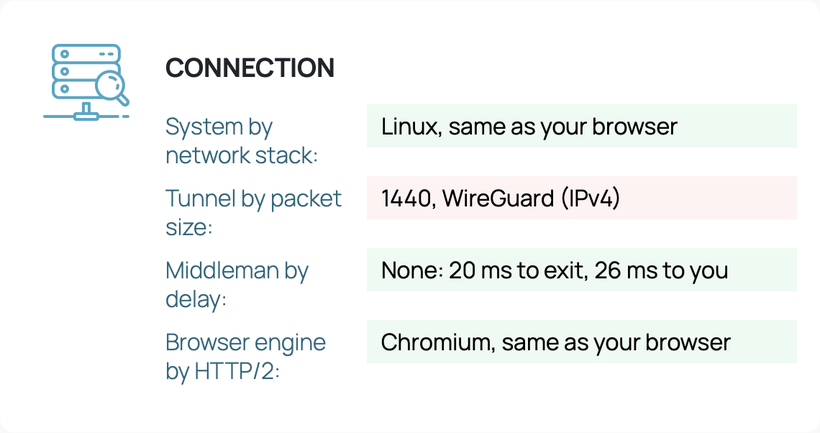
Relax, nothing leaked and nothing is broken. Every VPN tunnel makes your packets a bit smaller than normal, and any server you connect to can see that size. Let's look at where the number comes from, how to read it and what actually changes it.
Why a VPN makes packets smaller
Data travels over the internet in packets, and every network has a ceiling: a packet above a certain size won't get through. That ceiling is called MTU (Maximum Transmission Unit). On an ordinary home or office network it is 1500 bytes.
A VPN doesn't send your packets as they are. It encrypts each one and puts it inside another packet addressed to the VPN server. Think of a letter inside a second envelope. The outer envelope still has to fit into the same 1500 bytes, so the letter inside has to shrink.
Here is the math for WireGuard:
- the network lets 1500 bytes through;
- the outer IP header takes 20 bytes, UDP takes 8 and WireGuard itself takes 32;
- 1500 − 60 = 1440 bytes are left for your packet.
If you reach the VPN server over IPv6, the outer header is 20 bytes fatter and you are left with 1420. That's why almost every WireGuard app sets 1420 out of the box: it works in both cases.
Each tunnel protocol has its own wrapper, so each one leaves its own number.
How a website sees the size
When your device opens a connection, its very first packet tells the server the largest piece of data it is ready to accept. That's how TCP works: without it the server wouldn't know what size of chunks to send back. The value comes from the MTU of your network interface. And with a VPN on, your interface is the tunnel.
So the server knows your packet size before the page even starts loading. It needs no JavaScript, no cookies and no access to your browser. On Whoer this check is done by our server closest to you, in Europe, Asia or North America. Three things follow:
- a different browser, private mode or extensions change nothing;
- every browser on the same device shows the same number;
- the number is about your network path, not about the page you opened.
What the numbers mean
| Packet size | What it usually means |
|---|---|
| 1500 | ordinary network, no tunnel |
| 1492 | home connection over PPPoE (DSL and some fibre lines), no tunnel |
| 1440 | WireGuard, server reached over IPv4 |
| 1420 | WireGuard by default, also IKEv2 and IPsec |
| 1400, 1412 | IPsec, IKEv2, L2TP over IPsec |
| 1380, 1384 | WireGuard on top of a network that is tunnelled itself, NordLynx |
| 1476, 1480 | GRE and IP-in-IP tunnels |
| 1280 | Tailscale |
The Tunnel by packet size row gives one of four answers:
- 1500, no tunnel. Your packets look like an ordinary network.
- A number with a protocol name. The size matches a known tunnel exactly.
- A number alone. The size is unusual but matches no tunnel exactly. Whoer doesn't count it against you.
- N/A. The check didn't finish in time, reload the page.
A smaller packet is not always a VPN
Packet size is a hint, not proof. Ordinary networks wrap traffic too:
- mobile operators push your data through their own internal tunnels, so on mobile data the number is often below 1500 with no VPN at all;
- some home providers deliver IPv4 over an IPv6 network, and that eats another 40 bytes;
- offices and campuses often send everything through a tunnel to the head office.
Seeing a tunnel on mobile data with the VPN off? Open Whoer over Wi-Fi and compare.
For the same reason anti-fraud systems don't block on packet size alone. They add it to other signs of a VPN: an IP address from a data center, a time zone that doesn't match the IP, a browser language from another country. On Whoer a tunnel found by packet size takes 10% off your anonymity score.
How to fix it
First ask yourself honestly whether you need to. If your VPN is there to protect you on public Wi-Fi or to hide your IP address from websites, the tunnel is doing its job and a visible packet size gets in nobody's way. It starts to matter when a website treats VPN users differently: asks for extra checks, throws CAPTCHAs at you or limits your account.
You can't make the same tunnel carry bigger packets, because the outer envelope always takes its space. Something else works. The connection to the website has to start outside the tunnel.
Let a proxy open the connection
A proxy server (SOCKS5 or HTTP) doesn't forward your packets. It takes your request and opens its own new connection to the website. The website sees the proxy's packet size, and on a regular server or a home line that is 1500.
This works for a proxy on its own and for a proxy placed after a VPN: the VPN protects your traffic up to the proxy, and from there the proxy talks to websites. Choosing one? See how a proxy differs from a VPN and when residential proxies are worth it.
Use a protocol that works like a proxy
Shadowsocks, VLESS and Trojan usually sit in the same list as VPN protocols, but under the hood they are proxies. The server opens connections to websites on your behalf, so the size of your own packets simply never reaches them. WireGuard, IKEv2 and OpenVPN forward your packets as they are, and the size rides along.
Mind the distance
A proxy leaves a trace of its own. The answer from the website now makes two hops, first to the proxy and then to you, and the extra time can be measured. Whoer shows it in the next row, Middleman by delay. The closer the proxy is to you, the smaller the gap. Pick an exit in your own region, not on another continent.
If you run your own VPN server
When both ends of the tunnel are yours, you can set the tunnel MTU to 1500 on the server and on the client. In OpenVPN the option mssfix 0 does the same job. Your device then announces the usual size, and the outer packets that no longer fit get split in two before they are sent. You pay for it with speed, and some networks drop split packets. Test it on your own setup first.
What does not help
- Another server or country in the same VPN app. Same protocol, same size.
- Another browser, User-Agent or time zone. The check works below the browser.
- A bigger MTU on your side only. Answers from websites stop fitting into the tunnel, and pages start to hang.
- Some other MTU below 1500. Whoer may stop naming the protocol, but the packet is still smaller than normal, and that's what other systems look at.
How to check the result
Open Whoer again and look at the Connection card. If it worked, the tunnel row says 1500, no tunnel and Middleman by delay says None.
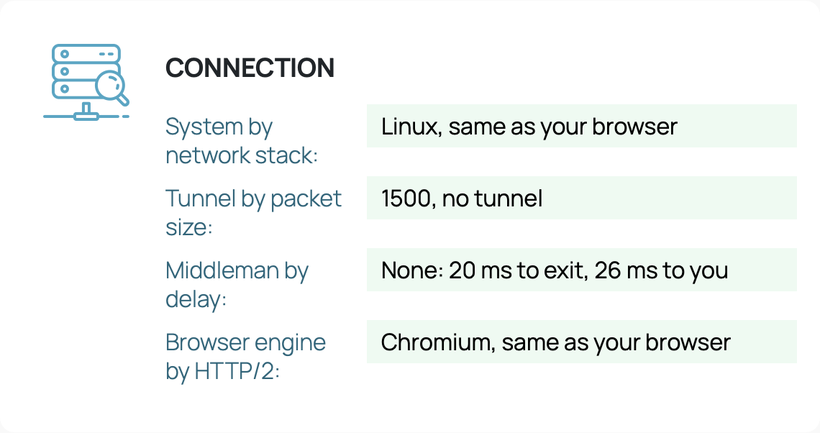
Tunnel row fine, but the middleman row turned red? The proxy is too far from you. Pick a closer one.
Check your connection on Whoer
Summary
A smaller packet is the natural footprint of a VPN, not a mistake in your settings.
- The tunnel sets the size of your packets, and every server you connect to sees it.
- 1500 and 1492 look like an ordinary network. 1440, 1420, 1400 and their neighbours look like a tunnel.
- It is one signal among many, and mobile networks produce it without any VPN.
- To remove it, let a proxy or a proxy-style protocol close to you open the connection to websites.